

Google Citation Search: A Comprehensive Guide for Researchers
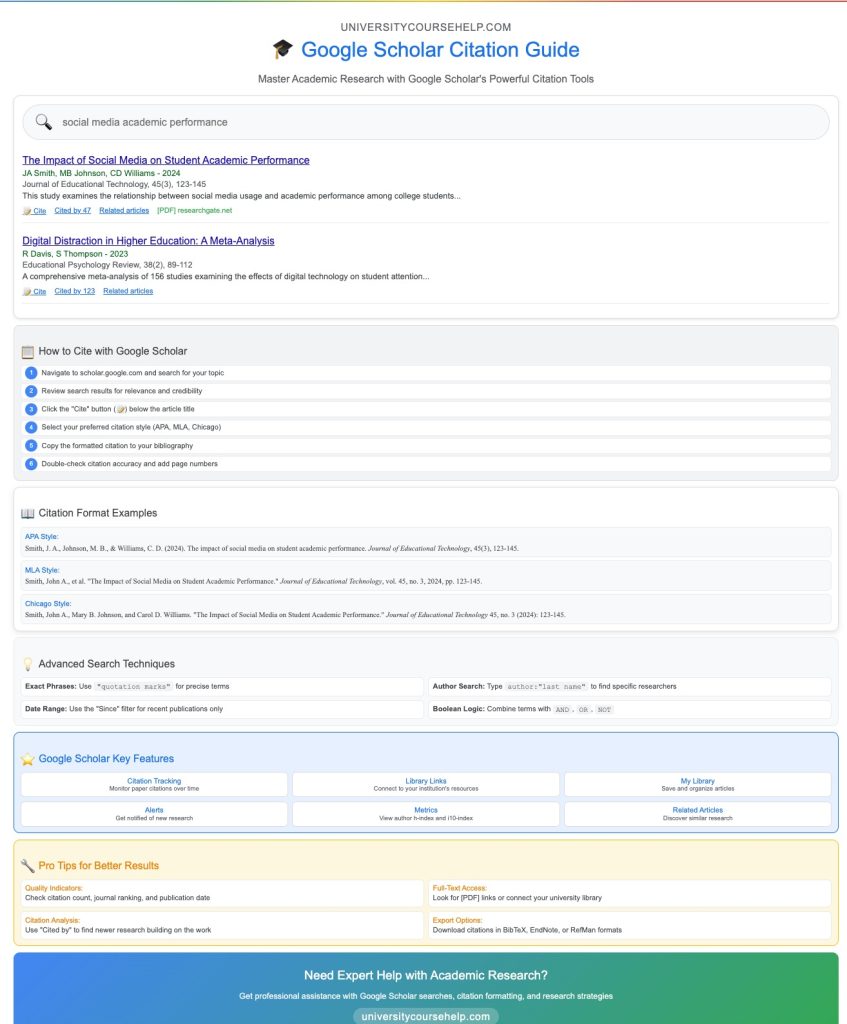
In today’s academic world, research requires access to reliable, scholarly sources that can provide strong evidence and context for your work. One of the most valuable tools for finding these sources is Google Scholar, a specialized search engine designed to help users locate scholarly literature such as academic articles, theses, conference papers, and books. One essential feature of Google Scholar is its ability to perform a Google citation search, making it easier to track how articles have been referenced by other researchers.
In this post, we’ll dive into how to use Google citation search, provide examples, and show how you can cite articles effectively from Google Scholar.
What Is Google Citation Search?
Google citation search is a tool provided by Google Scholar that helps you find articles that cite a particular source. This feature is incredibly useful when you want to track how influential an academic article or research paper is within the academic community. By searching for citations, you can see how many times an article has been cited by other research papers and which papers are citing it.
You can perform a citation search in Google Scholar by looking up the title of an article, author name, or related keywords. Once you find your article, you can click the “Cited by” link to view a list of articles that have referenced it. This is particularly helpful when you want to explore the academic impact of a piece of research or find related studies on the same topic.
Format: How to Perform a Citation Search in Google Scholar
To perform a Google citation search, follow these simple steps:
- Go to Google Scholar
- Visit Google Scholar and enter a search term related to your topic. This could be a title, author, or relevant keywords.
- Find Your Article
- Once the search results appear, locate the article or research paper you’re interested in.
- Click the “Cited by” Link
- Beneath the article’s entry, you’ll see a “Cited by” link, which tells you how many times the article has been cited by other research papers.
- Explore Citing Articles
- By clicking the “Cited by” link, you’ll get a list of articles that have cited the original paper. These results allow you to track how the paper has influenced research in your field.
Using Google Scholar’s citation search can help you explore a wealth of related literature and identify key studies in your research area.
Research Paper Outline Example: Organizing Citations in Your Paper
When you’re conducting research for your paper, organizing your sources is crucial. Using Google Scholar for your citation search can significantly improve the organization of your research paper outline. After performing a journal article search or academic journal search, you can create an outline that includes your sources as follows:
- Introduction
- Begin with your research question and a thesis statement. Identify the main idea and how each source you’ll cite supports your arguments.
- Body
- Organize your paper by breaking it into sections and subsections. Each section should discuss a specific aspect of your research, supported by the articles you’ve found using Google Scholar. Use the “Cited by” feature to highlight how certain papers have contributed to your argument.
- Conclusion
- Conclude by summarizing your key points and reinforcing your thesis statement, referencing the important articles you found during your citation search.
By using a full sentence outline format, you can further develop each section, ensuring that your sources are appropriately cited in the correct context.
Using the Search Box: Efficiently Narrow Down Your Results
The search box in Google Scholar is one of the most useful features for finding academic sources. When you enter a search term, Google Scholar will generate a result list of articles that are relevant to your query. To refine your results, use exact phrases, keywords, or even specific authors or titles in the search box.
- Search Box Tips:
- Use quotation marks around phrases to ensure exact matches for specific terms.
- If you’re looking for a particular author, include their last name and first name in the search.
- Use advanced search options to narrow your results by date range, journal, or even specific keywords.
This allows you to filter through a massive amount of academic content and find the most relevant articles for your research project.
Are All Articles on Google Scholar Peer Reviewed?
Google Scholar provides a vast range of academic articles, but not all articles listed on the platform are peer-reviewed. While many of the results from academic journal searches will indeed be peer-reviewed, it’s important to verify the source.
- To determine if an article is peer-reviewed, you can check:
- The publication name in the search results.
- The journal’s website, where peer-reviewed status is usually clearly stated.
- The citation record in Google Scholar, which often includes references to other peer-reviewed papers.
While Google Scholar indexes a variety of scholarly literature, it also includes content that might not undergo the rigorous review process associated with peer-reviewed journals. To be absolutely sure, always verify the source via external databases like Web of Science or consult guides at university on identifying reliable academic sources.
How to Cite from Google Scholar: Exact Step-by-Step Guide
When you find the right article in Google Scholar, citing it is simple. Here’s how you can cite from Google Scholar:
- Search for the Article: Type your keywords into the search box in Google Scholar and locate the article you want to cite.
- Click on the Quotation Mark Icon: Beneath each result, you’ll see a quotation mark icon. Click this to open citation options.
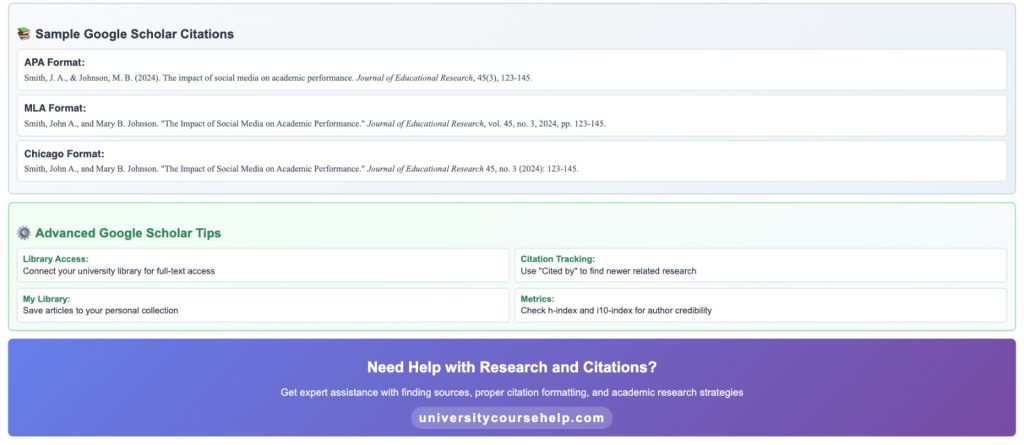
- Choose Your Citation Style: Google Scholar allows you to cite Google Scholar in various formats, including APA, MLA, and Chicago. You can simply copy the citation in the format you need.
- Save or Export: You can also import the citation directly into reference management tools like Zotero or EndNote by selecting the corresponding link.
This makes it easy to cite scholarly articles directly from Google Scholar, saving you time when preparing your bibliography or works cited page.
How to Find Academic Sources and Where to Look
Where can I find academic articles? The answer is simple: Google Scholar is one of the best places to start, but it’s not the only source. You can also use databases like PubMed, Scopus, and Web of Science for comprehensive academic journal searches.
Here’s how to find academic sources effectively:
- Use Google Scholar’s Search Box: Start by searching for articles in the search box. Google Scholar provides a wealth of scholarly literature, and by refining your results, you can narrow your focus to only the most relevant academic articles.
- Use Filters and Tools: Once you have a result list, you can narrow your search by publication year, author, and more. Advanced search options allow you to focus on exact topics or issues related to your research.
- University Guides: Many universities provide library guides and libguides at university to help you locate and access academic articles across various disciplines. Your librarian can also help you locate sources not found on Google Scholar.
By using these resources and search strategies, you can effectively find academic sources that support your research.
Record and Track Your Research: Keeping Your Citations Organized
It’s important to keep track of the sources you find during your article search. One useful way to do this is by maintaining a record of your citations, including the articles you plan to cite. Google Scholar allows you to save sources in your profile, where you can access them later. You can also use reference management software like Zotero or EndNote to create and organize your record of citations.
By using these tools, you can stay organized, ensure proper citation, and track the research you’ve done for your paper.
In conclusion, Google Scholar is a powerful tool for searching for citations and academic sources, but it’s essential to remember that not all articles are peer-reviewed. Using advanced search options, citation tools, and external databases will help you gather reliable sources for your academic work. By following these tips, you can efficiently conduct your research and cite your findings using the tools provided by Google Scholar.
Find Peer-Reviewed Articles in Google Scholar with Ease
Searching for reliable, peer-reviewed articles? UniversityCourseHelp.com can help you navigate Google Scholar to find the best academic sources for your research. Use our expert tips and tools to refine your search and ensure the quality of your references.
How to Cite Articles from Google Scholar
When using Google Scholar, it’s essential to know how to cite the articles you find. Google Scholar provides an easy tool to generate citations in various formats such as APA, MLA, and Chicago. Here’s how you can cite from Google Scholar:
- Search for Articles
- Use the search box in Google Scholar to locate relevant academic articles, journals, or research papers.
- Click the Quotation Mark Icon
- For each result, you’ll see a quotation mark icon (“Cite”) under the article’s entry. Clicking this will show you several citation formats.
- Select Citation Style
- Choose the citation format that matches your needs (e.g., MLA, APA). Copy the citation and paste it into your bibliography or works cited page.
This tool is incredibly useful for researchers, helping to streamline the citation process and ensuring that your references are correctly formatted.
Cited by Searching: Track the Influence of Key Papers
Cited by searching is a powerful feature of Google Scholar that allows you to explore the academic impact of an article. By clicking on the “Cited by” link below any article in Google Scholar, you can view a list of citing articles that reference the original source. This helps researchers see how influential a paper is in the academic community.
This feature is particularly useful when you want to find academic sources related to your topic. By tracing the articles that cite a particular source, you can uncover new research that is relevant to your field. Furthermore, cited reference searching can help you expand your research paper outline by pointing to newer studies that have referenced key ideas from earlier publications.
Librarian: A Valuable Resource in Citation Search
Librarians are experts in helping students find academic articles and navigate databases like Google Scholar. Many universities offer guides at university and library guides that can help you learn how to use these databases effectively. Librarians can assist in advanced search techniques, such as narrowing your search by author, date, or publication to find the exact articles you need.
They can also guide you in using citation tools and show you how to cite sources correctly. When you visit your university library, you can also ask the librarian for MIT Google Scholar access or help you locate Web of Science for a more specific academic journal search.
Reference: How to Properly Cite Sources in Google Scholar
Reference management is an essential part of the research process. When using Google Scholar, you can easily generate citations for the sources you find. After finding an article, click on the quotation mark icon below the result to cite the article in various formats like APA, MLA, and Chicago.
For example, if you’re working on a psychology paper, Google Scholar can help you cite from Google Scholar accurately, ensuring that you follow the correct citation format.
- How do you cite on Google Scholar?
Simply click the quotation mark icon next to the article and choose your desired citation format (APA, MLA, etc.). You can then copy it into your bibliography or import it into citation management tools like Zotero or EndNote.
Web of Science: Advanced Search for Scholarly Articles
Web of Science is another powerful resource for academic researchers. It provides access to a wide range of peer-reviewed journals and other scholarly materials. When using Web of Science, you can conduct an advanced search to find articles in your discipline. This search engine allows you to filter results by exact title, author, or publication date to narrow down the search results.
If you’re looking for a comprehensive article search or journal article search, Web of Science helps you access databases that are often not indexed in other search engines. You can even navigate the platform’s index to find articles that match your research needs.
Cited Reference Searching: Trace Citations for Greater Depth
Cited reference searching is a technique that allows you to trace how a particular article has influenced other works in the field. By searching for articles that have cited a source, you can understand its significance in the literature and discover new research that builds on the original document.
If you are looking to explore the influence of an article, use Google Scholar’s cited by searching feature or use databases like Web of Science to conduct a cited reference search. By doing this, you can expand your literature review and strengthen your arguments with up-to-date, relevant sources.
Author: Find Specific Works Using an Author’s Profile
Author profiles in Google Scholar are a great way to locate all works published by a particular researcher. If you know the author of the research you’re interested in, search for them in Google Scholar and visit their profile to view their complete body of work.
- To find articles by an author, simply enter their last name and first name into the search box.
- Once on the author’s profile, you can see a list of their publications along with citation counts, which can help you assess the impact of their work in your field of study.
By searching for a researcher’s profile, you can also explore related documents and see how their work has influenced the current literature.
Advanced Search: Narrow Your Search Results
Advanced search options are available in Google Scholar to refine your search. You can use exact phrases or specific keywords to narrow down the search results and focus on the most relevant research in your discipline.
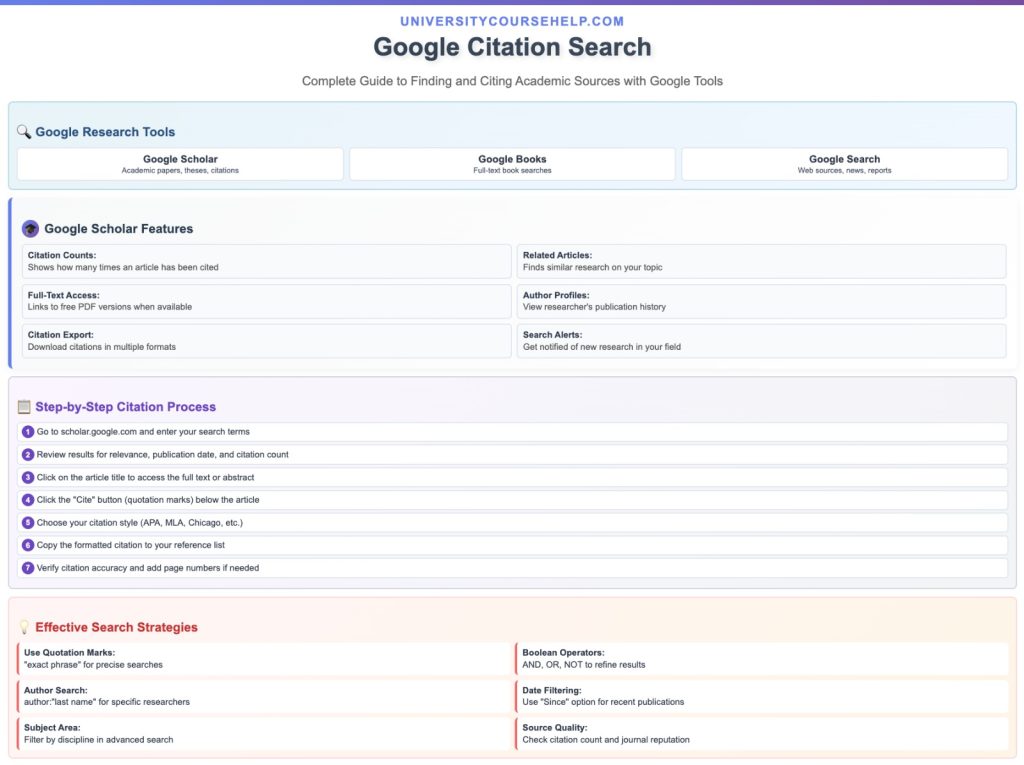
- In Google Scholar, click on the three-line menu and select Advanced Search to filter results by author, publication, and date. This will help you locate articles that match your exact research needs, improving your efficiency.
- You can also check the box to search within a specific range of years or publications, making it easier to find the most current research.
Using advanced search can help you locate scholarly literature that is highly relevant and credible for your paper.
Matching Articles: Use Google Scholar’s Tools to Find Relevant Sources
Google Scholar allows you to easily match articles to your research topic by offering suggestions based on your search history and interests. As you type in search terms, Google Scholar’s algorithm shows results that closely match your query, whether they are peer-reviewed journal articles or scholarly papers.
If you’re working on an in-depth paper or project, consider using Google Scholar’s advanced search or the search box to refine your results further. Google Scholar also provides links to import citations into reference management tools, saving you time on formatting your bibliography.
This guide should help you better understand how to search citations, cite sources, and find academic articles using tools like Google Scholar and Web of Science. Whether you’re conducting a literature review, working on a research paper, or publishing your findings, these features will enhance your research process. UniversityCourseHelp.com offers resources to help you write your paper effectively, from citation tools to detailed guides on how to find and cite academic sources.
Using Google Scholar to Find and Cite Academic Sources
Google Scholar is an indispensable academic journal search engine for locating credible and peer-reviewed articles. To maximize the utility of Google Scholar, you can use advanced search features to narrow down results:
- Search by Author: If you’re looking for works by a specific author, you can use their last name in the search to find their published research.
- Search by Discipline: Google Scholar allows you to narrow results by the field or discipline of study, helping you focus your search on relevant literature.
- Citation Counts: Look for articles that have been cited by a large number of other papers. These articles often have significant influence in their respective fields.
You can also use library guides or libguides at university to help you locate academic articles and refine your search results. Librarians often create these guides to assist students in finding academic sources effectively.
Example: Using Google Citation Search for Your Research
Let’s say you’re researching the impact of artificial intelligence in healthcare. Here’s how Google citation search can assist:
- Find the Key Articles: Begin by searching for important papers in Google Scholar about AI in healthcare.
- Click “Cited By”: After locating a key article, click on the “Cited by” link to explore other articles that have referenced it.
- Narrow Your Search: Use the advanced search option to filter results by date or author, ensuring you find the most relevant studies in your field.
- Cite and Organize: When you find the articles you want to use, click on the quotation mark icon to cite them in the proper format.
By utilizing Google Scholar’s tools, you can easily find academic articles, track citations, and organize your research for a well-structured paper. Whether you’re working on a research proposal or preparing a final research paper, Google citation search is an invaluable tool for any researcher looking to enhance the quality and depth of their work.
FAQs about Google Citation Search: Google Scholar Research Guide to Search
1. How to Search Citations in Google?
To search for citations in Google, you can use Google Scholar as it’s an academic article search engine specifically designed for finding scholarly articles, citations, and research papers. Simply go to Google Scholar, and type in the article title, author name, or keywords related to the article you want to find.
- You can use the search box to find academic sources by entering relevant terms or specific references.
- Once you have your search results, look for the cited by link below the article, which shows how many times the article has been cited.
- Google Scholar will also provide options to cite the article directly in various citation styles (MLA, APA, Chicago, etc.).
2. Does Google Have a Citation Tool?
Yes, Google Scholar provides a citation tool for academic sources. Once you find an article or academic paper, you can click on the quotation mark icon below the search result to generate citations in multiple formats such as MLA, APA, Chicago, and others. This tool allows you to easily copy the citation for your bibliography.
- Simply search for citations in Google Scholar.
- After finding the desired article, click the quotation mark to view citation styles.
- You can then copy the citation or use the links provided to import the citation directly into citation management tools like Zotero or EndNote.
Google Scholar also shows the citation counts, indicating how often the article has been cited, and you can see a list of citing articles.
3. How Do I Do a Citation Search?
To search for citations, follow these steps:
- Use Google Scholar: Head to Google Scholar.
- Search for Articles: In the search box, enter the title, author, or keywords that match the article or content you’re looking for.
- Click on Cited By: Once the results appear, you’ll see a “Cited by” link under each article entry. Clicking on this link will give you a list of citing articles, which are the articles that have cited the original source.
- Advanced Search: You can also narrow your results by using the advanced search feature available in Google Scholar to filter by author, publication, or date range.
This allows you to conduct a reverse citation search to see how specific articles have been cited in other research.
4. How to Cite a Google Search in MLA Format?
To cite a Google search in MLA format, you need to cite the source of the specific search results you are referring to. Here’s how you can cite it in MLA format:
- Cite the Original Source: You cannot directly cite a Google search, but you can cite the source or article found in the search results.
- Citation Format:
- Author(s). Title of the article. Title of the Website, publisher, date of publication, URL.
- For example:
- Brown, John. “The Influence of AI on Modern Healthcare.” Journal of AI Research, MIT Press, 2021, www.mitresearch.org/articles/influence-ai-healthcare.
If you’re citing from Google Scholar, the citation will appear in your desired style directly on the result page when you click the quotation mark icon. You can copy it and adjust it if necessary.
- In MLA format, if you are citing from Google Scholar, follow the format for citing journal articles or books found through online databases like Web of Science or Scopus.

