

Research Paper Title Page: A Comprehensive Guide

The title page of a research paper is the first impression readers have of your work. It sets the tone for the content that follows and adheres to specific formatting guidelines set by academic institutions and style manuals like the American Psychological Association (APA). The research paper title page is an essential part of any academic paper, and following proper formatting conventions is crucial for submitting a professional and well-organized paper.
In this blog post, we’ll delve into the specifics of the research paper title page, focusing on APA style, its components, and how to format it correctly for student and professional papers.
What Is a Research Paper Title Page?
A research paper title page is the very first page of your paper, and it includes key information such as the title of your paper, the author’s name, their institutional affiliation, course number, instructor’s name, and the date of submission. This page serves as a formal introduction to your research and provides essential information for readers.
There are various formatting styles for title pages, with APA style being one of the most commonly used formats, especially in the fields of psychology, education, and the social sciences. This post will primarily focus on APA style but will also touch on other formats such as MLA when necessary.
APA Style Title Page: Key Components
When using APA format, your research paper title page should include the following essential elements:
- Title of the Paper: The title should be centered, bolded, and in title case. It should give a clear idea of your paper’s subject matter and its scope. Ensure the title is concise and specific.
- Author’s Name: Beneath the title, your full name should be centered on the page.
- Institutional Affiliation: Directly below your name, list the institution to which you are affiliated (e.g., your university’s name).
- Course Information: On the next line, include the course number and the course name for which the paper is being submitted.
- Instructor’s Name: Include the name of your professor or instructor.
- Assignment Due Date: This should be the date on which the assignment is due.
- Running Head: For professional papers, you will need to include a running head, which is a shortened version of your title, aligned to the left side of the header. For student papers, the running head is not required.
- Page Number: Page numbers should be included in the top-right corner of the title page (and throughout the rest of the paper).
Example of a Title Page in APA Style
Title:
The Role of Social Media in Political Campaigns
Author:
John Doe
Institutional Affiliation:
University of XYZ
Course Number and Name:
PSY 101: Introduction to Psychology
Instructor Name:
Dr. Jane Smith
Due Date:
September 30, 2023
Formatting the Title Page
APA Format Abstract
If your paper includes an abstract, the title page will also include the heading “Abstract” (centered at the top). The abstract is a concise summary of your paper that provides an overview of your research question, methodology, and findings. Typically, the abstract is limited to 150-250 words. It is placed on the page following the title page.
Citation APA
In APA style, every source used in your research must be properly cited, including in-text citations and the reference list. This ensures you give proper credit to the original authors whose work you have used. Each reference should follow the standard APA citation format.
Student Paper vs. Professional Paper
The formatting for a student paper in APA style differs slightly from a professional paper. A student paper does not require a running head (except for certain university-specific guidelines), and the title page may include additional information like the course number and instructor’s name. On the other hand, a professional paper requires a running head, author’s note, and other specifics that are omitted in the student version. Always follow your institution’s requirements for the specific version of the title page.
First Page
The title page serves as the first page of your paper. The title page should be double-spaced, and the text should be in Times New Roman font, size 12-point. Use the left margin and ensure that the title and other details are aligned appropriately. For a student paper, the title page should be set up according to the format provided by your instructor or university.
What Should Be Included in the Title Page?
In addition to the elements mentioned above, the title page must follow specific formatting guidelines:
- Title: The title should be centered in bold, in title case, and placed on the top half of the page.
- Author’s Name: Your full name should be centered beneath the title.
- Institutional Affiliation: Centered beneath the author’s name.
- Course Number and Course Name: This information should appear below your affiliation.
- Instructor’s Name and Due Date: Placed at the bottom of the title page.
- Running Head: In professional papers, the running head is aligned to the left of the header, while the page number is on the right.
- Author Note: For professional papers, this includes additional information about the author, such as conflicts of interest or correspondence details.
Title Page Template
Creating a title page is easy with a pre-built page template that you can download. These templates follow the APA format, and you can fill in the required information, ensuring that your title page is formatted correctly from the get-go. For students, these templates ensure consistency and make sure all the necessary details are included.
Example of APA Title Page Template:
- Title (centered, bolded)
- Author Name (centered)
- Institutional Affiliation (centered)
- Course Number and Name (centered)
- Instructor Name (centered)
- Due Date (centered)
- Page Number (top right)
Best Practices for Research Paper Title Page Formatting
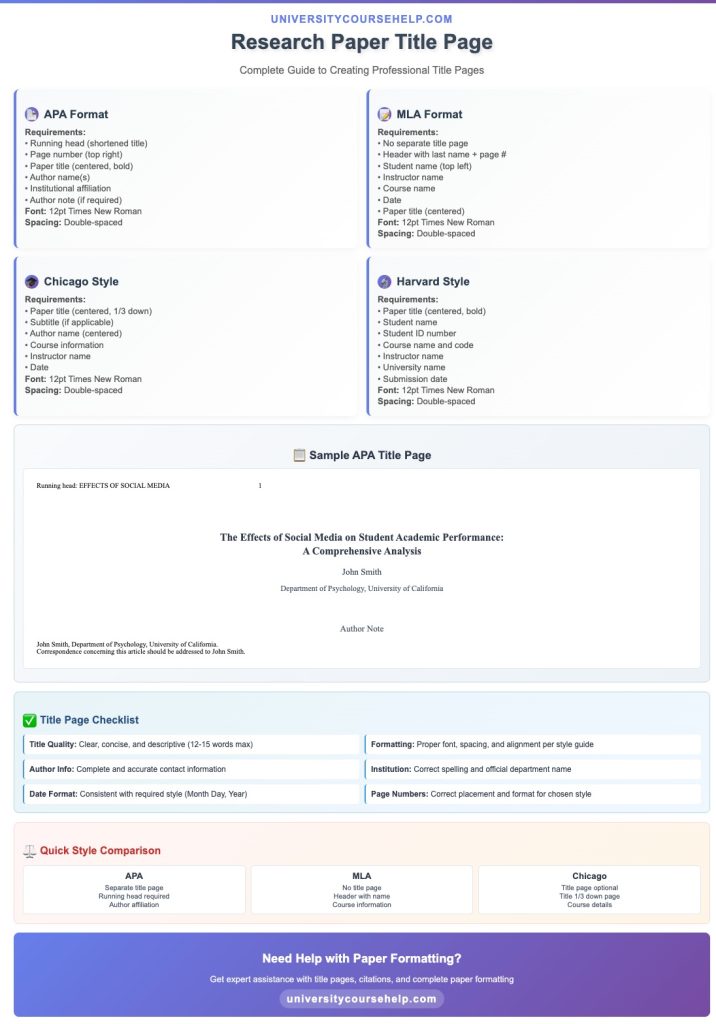
- Double-Space: Ensure all text on the title page is double-spaced.
- Times New Roman Font: Use 12-point Times New Roman for consistency.
- Capitalization: Only capitalize the first word of the title and the first word after a colon or punctuation mark (unless proper nouns are involved).
- Alignment: Ensure that all elements are centered horizontally on the page.
- Page Numbers: Place the page number in the top-right corner, starting with “1” on the title page.
APA Style Student: A Comprehensive Overview
When writing a research paper in APA style, it’s crucial to understand the components of the title page and how to format it correctly. For students, the title page adheres to specific guidelines that ensure consistency and professionalism in academic papers. Here’s a step-by-step guide to help you understand what your APA style student title page should include and how to format it correctly.
Title Page Includes Essential Elements
Your title page is the first page of your research paper and serves as the formal introduction to your work. It typically includes the following essential elements:
- Title of the Paper: This should be centered at the top of the title page. Use title case, which means capitalizing the first letter of each major word.
- Author’s Name: Below the title, place the author’s name (your name as the writer), centered on the page.
- Institutional Affiliation: Below the author’s name, include your author affiliation—the name of the institution you’re affiliated with (e.g., your university).
- Course Information: Under the institutional affiliation, include the course number and name, followed by the instructor’s name, and then the assignment due date.
Top of the Title Page: Formatting Details
The top of the title page is where you place the title and author information. Here are the formatting guidelines:
- The title should be centered and bold.
- The author name should be centered directly below the title.
- Your institutional affiliation should be placed below the author’s name and centered on the page.
Bottom Half of the Title Page: Completing the Information
The bottom half of the title page contains the additional details that follow the title and author information. This includes:
- Course Number and Name: Beneath the institutional affiliation, include the course number and name for the paper.
- Instructor’s Name: Following the course details, place the instructor’s name centered below.
- Assignment Due Date: Lastly, place the assignment due date at the bottom of the title page.
Place the Title: Center and Bold
In APA style, the title of your paper should be both centered and bolded. This ensures the title stands out and is easily visible. Make sure the title is concise but descriptive enough to give the reader a clear understanding of the paper’s subject matter.
Insert Page Numbers and Running Head
In APA style student papers, page numbers must be inserted in the top-right corner of each page, starting with the title page. The running head is a shortened version of your paper’s title, and it appears in the header of the professional version. However, for student papers, the running head is typically not required.
The title page will display the running head on the left side of the header and the page number on the right. In the student version, you don’t need to include the running head unless specified by your instructor.
Half of the Title Page: Author and Affiliation Details
The half of the title page contains the author’s name and institutional affiliation. These elements should be centered and clearly distinguishable from the other sections of the title page. This section helps the reader easily identify who is submitting the paper and where the work was completed.
Author Affiliation and Keyword
After the title and author name, the author affiliation (such as your university or institution) should be listed. Keywords are sometimes requested by instructors, especially for research projects. They are typically placed below the title to describe the main themes of your paper.
Separate Page: MLA Title Page Example
Unlike the APA style title page, which is typically followed by a separate page for the abstract, an MLA title page has a different format. MLA formatted papers do not require a separate abstract or running head, and the title page follows a simpler format without the additional details that APA style requires.
For example, an MLA title page would typically contain only the following:
- The title of the paper (centered, no bolding)
- The author’s name
- The course number and title
- Instructor’s name
- Date of submission
Format Shown: Consistency and Accuracy
Ensure that the format shown in this blog post is consistently followed. Using tools like Purdue OWL® can help provide a template and offer step-by-step guidance for formatting your title page in both APA style and MLA format.
Numeral and Capital Letters
When writing your APA style student paper, make sure that page numbers are written in numerals. You should also use capital letters when necessary, for example, in the title or headings.
By following the correct APA style student guidelines, you can format your title page with ease. Whether you are using the student version or the professional version, always ensure that you place the title and other necessary details in the proper sections and follow formatting conventions precisely.
Need Help Formatting Your Research Paper?
If you’re struggling to format your paper correctly, UniversityCourseHelp.com offers professional writing and editing services to ensure your title page and overall formatting meet academic standards. Let us help you present your research paper in the best possible light!
Conclusion
Creating a well-organized research paper title page is essential for ensuring your paper looks professional and adheres to academic standards. Whether you are submitting a student paper or a professional paper, following the specific APA style guidelines will give your paper the polished look that it deserves. The title page serves as a crucial introduction to your work and sets the stage for the reader to engage with your research.
Need Help Formatting Your Paper?
If you need assistance with writing or formatting your research paper, our experts at UniversityCourseHelp.com are here to assist. Contact us today for comprehensive research paper services, from topic selection to final proofreading!
FAQs about Research Paper Title Page: General Format APA, MLA, 7th Edition
How do you write a title page for a research paper?
Writing a title page for a research paper involves following specific formatting guidelines, such as those provided in the APA style format. When using APA format, your title page should include a centered title in title case, the author’s name, and institutional affiliation, as well as the course number, course name, instructor’s name, and the assignment due date. The title should be bolded and placed in the upper half of the page, while the rest of the information is placed in the bottom half. The page header (running head) and page number should be included in the upper right corner.
What is typically included in the title page of a research paper?
A title page in a research paper typically includes the title of the paper, the author’s name, and the institutional affiliation. For APA style, additional elements include the course number, course name, instructor’s name, and the assignment due date. The page header or running head, as well as a page number, should be included in the upper-right corner. These elements must be properly formatted, with the title in title case, and the content arranged in a clear, professional manner.
Is page 1 the title page?
Yes, in APA style, the title page is typically considered page 1. This page is not numbered with the page number explicitly listed in the header of the title page, but when using APA style formatting, it is treated as the first page of the paper. The page number is located in the upper right corner, beginning with “1” on the title page, as per the guidelines provided by the APA publication manual.
What should be included in the title page?
The title page of a research paper should include several key elements, particularly in APA format. These include:
- Title: Centered, bolded, and in title case.
- Author’s Name: The name of the paper’s author.
- Institutional Affiliation: The institution with which the author is affiliated.
- Course Number and Name: The course for which the paper is being written.
- Instructor’s Name: The name of the instructor or professor.
- Due Date: The assignment’s due date.
- Page Number: Page number placed in the header.
- Running Head: A shortened version of the paper’s title for professional papers, placed on the left side of the header.
For MLA formatted papers, the title page is generally not required, but if used, it should contain the paper’s title, the author’s name, and the institutional affiliation.
Additionally, always refer to the Purdue OWL® or LibGuides for specific formatting instructions and examples to ensure proper presentation, especially when using a student version of the title page for academic assignments.

